

Web Widget
Web Widget
Section titled “Web Widget”The Web Widget lets you embed a live chat window powered by your AI bot directly onto any website. Customize it to match your brand and deploy in minutes.
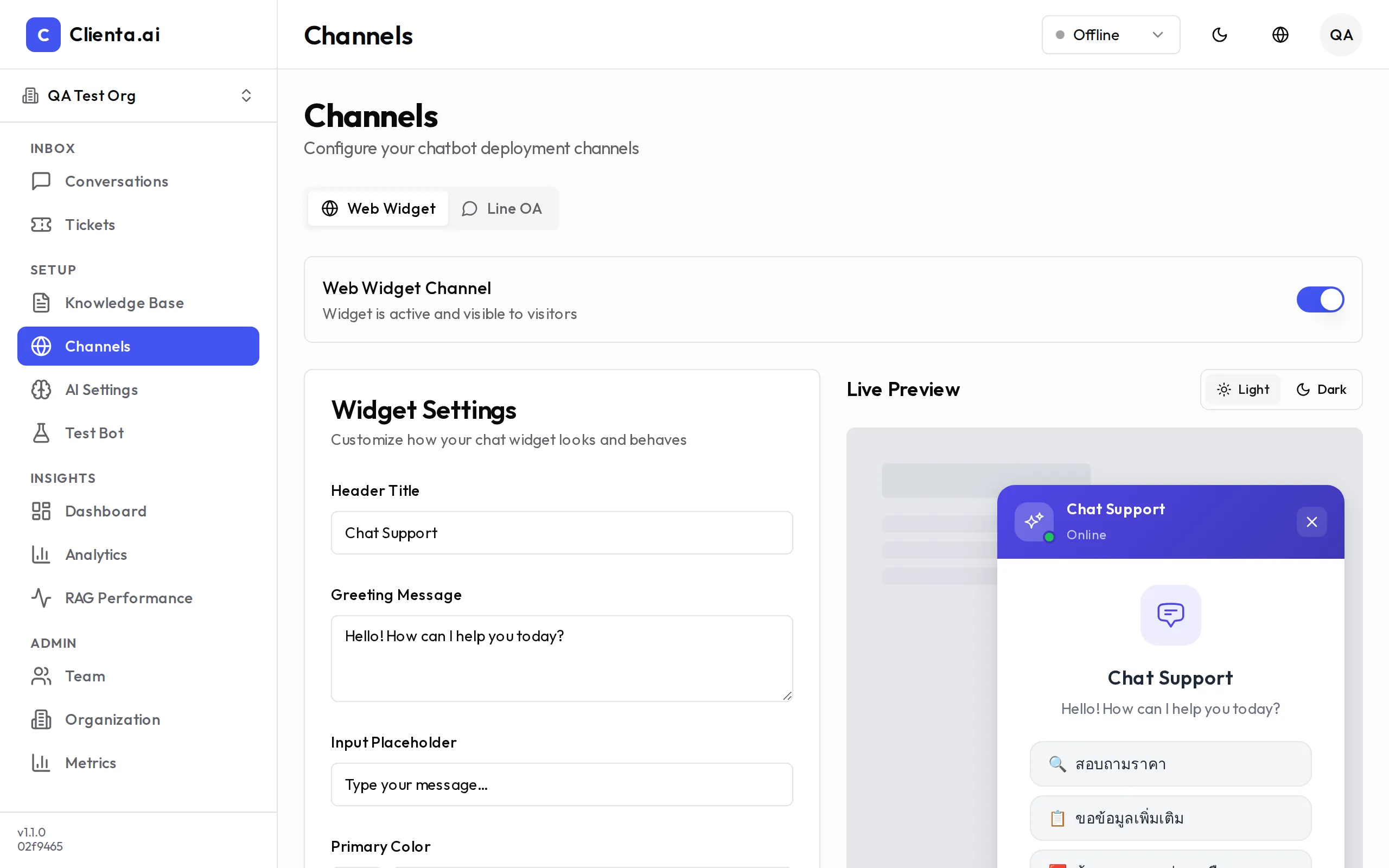
Installation
Section titled “Installation”-
Go to Channels → Web Widget in the left menu.
-
Click Create Widget and give it a name.
-
Configure the widget settings (see Customization below).
-
Copy the embed code snippet provided.
-
Paste the snippet into your website’s HTML, just before the closing
</body>tag. -
Save and publish your site — the widget will appear immediately.
Embed Code
Section titled “Embed Code”<!-- Clienta.ai Web Widget --><script> window.ClientaConfig = { botId: "YOUR_BOT_ID", widgetId: "YOUR_WIDGET_ID", };</script><script src="https://cdn.clienta.ai/widget/v1/loader.js" async></script>Replace YOUR_BOT_ID and YOUR_WIDGET_ID with the values shown in your dashboard.
Customization
Section titled “Customization”| Option | Description |
|---|---|
| Theme Color | Set the primary color to match your brand (hex code or color picker) |
| Welcome Message | The first message displayed when a user opens the widget |
| Position | Choose bottom-right or bottom-left placement on the screen |
| Avatar | Upload a custom avatar image for the bot |
Additional options include:
- Widget Title — Name shown in the widget header
- Placeholder Text — Hint text inside the message input box
- Auto-Open Delay — Automatically open the widget after N seconds (optional)
- Hide on Mobile — Toggle widget visibility on mobile devices
How It Works
Section titled “How It Works”-
User opens the widget — The chat window slides open from the corner of the page.
-
Message sent to bot — The user’s message is sent to Clienta.ai over a secure WebSocket connection.
-
AI processes and responds — The bot retrieves relevant content from the knowledge base and generates a reply.
-
Human handoff if needed — If confidence is low or the user requests a human, the conversation is routed to an available agent via the Conversations inbox.
WebSocket Real-time
Section titled “WebSocket Real-time”The widget uses a persistent WebSocket connection for real-time, low-latency messaging. Key behaviors:
- Auto-reconnect — The client automatically reconnects if the connection drops.
- Typing indicator — Shows a typing animation while the bot is generating a response.
- Message history — Conversation history is preserved within the same browser session.
- Cross-tab sync — If the user has multiple tabs open, the conversation state is synced.
Channel Limits by Plan
Section titled “Channel Limits by Plan”| Plan | Widgets | Concurrent Sessions | Message Retention |
|---|---|---|---|
| Starter | 1 | 50 | 7 days |
| Pro | 5 | 500 | 30 days |
| Enterprise | Unlimited | Unlimited | 90 days |